
The ROM Image Covers AT and MT
Although it is not very common in Japan, DIY ECU tuning is popular in the United States, where a considerable amount of ROM analysis information has been published.
In Japan, when converting from an automatic transmission (AT) to a manual transmission (MT), it is common to rewrite the ECU ROM with MT data. In fact, a single ROM image contains separate regions for both MT and AT data, and a method of switching between these regions without rewriting the ROM is known in the United States.
R4 Selects AT or MT Data
Whether the ECU uses the AT or MT data is selected by a resistor labeled "R4" on the ECU circuit board. R4 is not fitted to MT ECUs, and removing R4 from an AT ECU makes the ECU use the MT region of the ROM.
In other words, at least in terms of selecting the AT or MT data within the ROM, removing R4 from an AT ECU puts it in the same state as an MT ECU.
Looking at an AT ECU, there is a resistor labeled "R4" just below the ROM, and only that area of the circuit board is painted white.
I learned this after I had already obtained and installed an MT ECU, so I was unable to try it on my own AT ECU. However, this method is known in NSX communities outside Japan and is actually used when converting to a manual transmission.

Resistor R4 Selects MT or AT Data

NSX ECU ROM (27C256A)
A14 and Data Region Selection
The stock ROM in the NSX ECU is a 27C256A, an EPROM (Erasable Programmable Read-Only Memory) that can be erased with ultraviolet light and reprogrammed. This type of memory was widely used in electronic equipment during the 1980s and 1990s.
It is a 28-pin IC with a capacity of 256 Kbit (32 KB).
The ROM has 32 KB of storage. External signals on its 15 address lines, A0 through A14, specify the address to be read. When the most significant address line, A14, is Low, the 0x0000–0x3FFF region is selected; when it is High, the 0x4000–0x7FFF region is selected.
Considering these 27C256A specifications and the fact that R4 switches between the first and second 16 KB halves of the ROM, it seems likely that the presence or absence of R4 changes the state of A14 to select the MT or AT data region.
A ROM Image Is Not Enough
To modify the ROM data, simply obtaining a ROM image is not enough.
A ROM image is a binary file that stores the ROM's contents as a sequence of bytes. It does not contain human-readable prose, so opening it in a text editor produces an unintelligible display that looks like garbled text.
Opening it in a hex editor lets you inspect the ROM contents in hexadecimal and see the value stored at each address.
Of course, looking at these values alone does not tell you what data each address represents, so you cannot identify and modify the values you want to change.
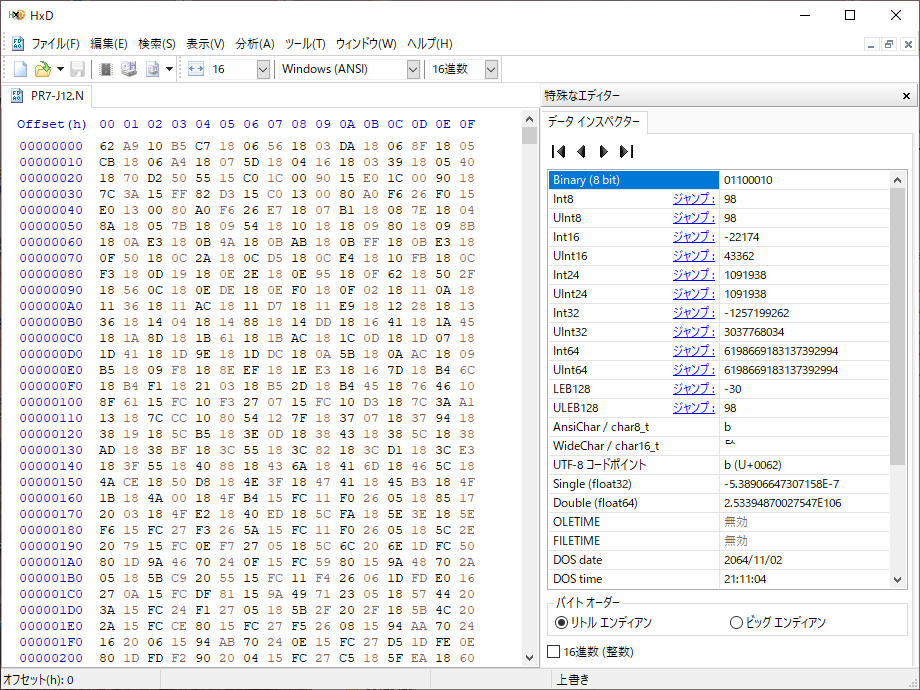
ROM Image Opened in the HxD Hex Editor
0x4000-0x7FFF Contains AT Data
A single 32 KB ROM image contains both AT and MT data regions. The first 16 KB is for MT, and the second 16 KB is for AT.
MT data occupies 0x0000–0x3FFF, and AT data occupies 0x4000–0x7FFF. As you scroll through the data, you will find address "00004000" near the middle, marking the boundary between the MT and AT regions (see note below).
Given this structure, it is possible that the procedure commonly called "rewriting the ROM with MT data" in Japan involves leaving R4 in place and writing MT data into the AT region at 0x4000–0x7FFF.
However, the actual procedures used by individual shops have not been disclosed, so this is only speculation.
Note: The prefix 0x indicates hexadecimal notation. In the HxD hex editor, these ranges are displayed as 00000000–00003FFF and 00004000–00007FFF, respectively.
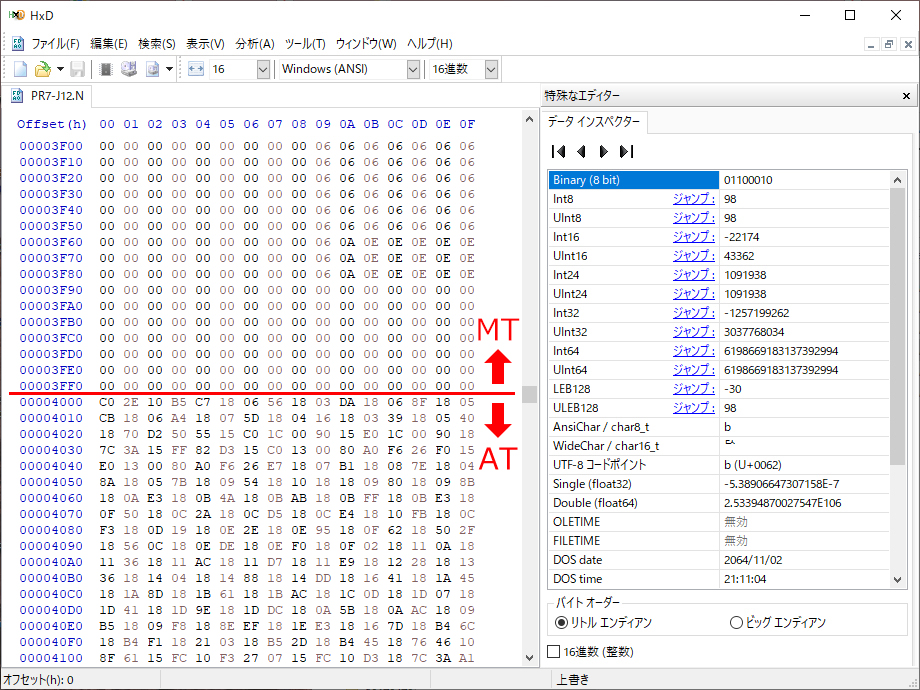
Boundary Between MT and AT Data (0x4000)
TunerPro ROM Data Comparison
Because both AT and MT data are contained in a single ROM image, obtaining one stock ROM image lets you compare AT and MT data for the same period and specification.
My NSX has already been converted to a manual transmission, and its ECU has also been replaced with an MT unit.
I eventually want to reproduce the stock MT engine specification as well, and I have already obtained MT camshafts. I therefore decided to obtain a ROM image and compare the actual differences in engine control between AT and MT.
To examine the ROM contents, I will use
"TunerProopen_in_new",
a ROM analysis and editing application widely used for ECU tuning outside Japan.
Simply installing and launching TunerPro does not let you view the contents of a ROM image (.bin file) as fuel or ignition timing maps.
You need an XDF definition file that specifies what data is stored at each address in the ROM.
Creating such a definition file normally requires analyzing the ROM, which is a very demanding task.
TunerPro itself was developed by Mark Mansur, but Matthew Wallace (Matt) analyzed the NSX/Legend ROM and created the XDF file for use with TunerPro. This XDF file is still available free of charge.
I will use
"Acura_NSX_and_Legend.xdfopen_in_new",
which can be downloaded from the TunerPro website under "Downloads" → "Definitions" → "Acura".
Opening the definition file in a text editor shows a list of entries specifying which numerical values each address represents.
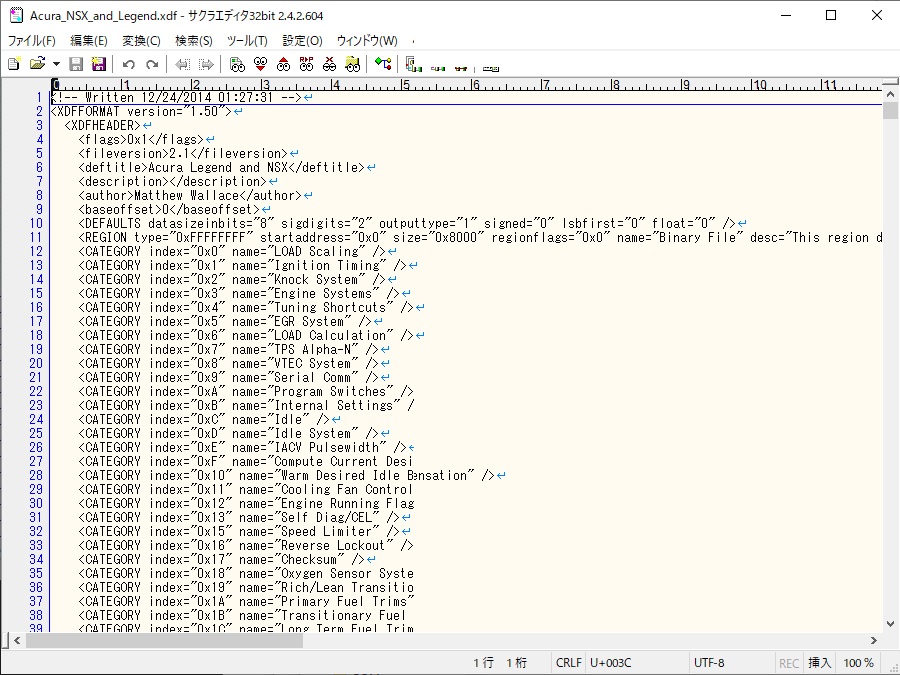
Definition File Opened in a Text Editor
Base Offset Selects the Data
Launch TunerPro, load the definition file above through "XDF" → "Select XDF...", and open the ROM image through "File" → "Open Bin...". You can then view the various maps.
By default, the XDF's Base Offset is "0000", so the MT data is displayed.
To view the AT data, open "XDF" → "View/Edit XDF Header Info" and change "Base Offset (Hex)" from "0000" to "4000".
This field uses hexadecimal notation (Hex), so entering "4000" specifies 0x4000.
Note that changing Base Offset does not automatically refresh maps that are already open. Close each map and reopen it to display the data for the new offset.
You can now switch between the MT and AT fuel maps, ignition timing maps, and other data in the same ROM image to compare them directly.
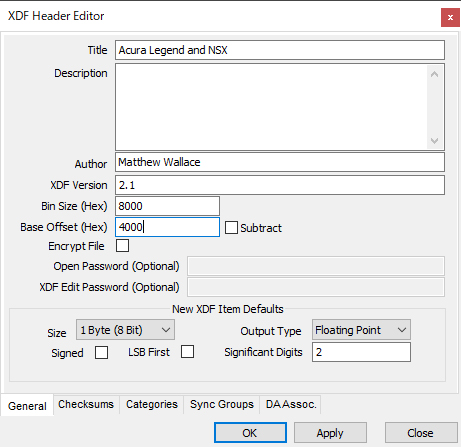
Changing the Offset in Header Info
734 Defined Parameters in Total
The items listed in the Parameter Tree on the left are the entries defined in the XDF file. Double-clicking an item opens a window displaying the data according to its definition.
There are 734 defined parameters in total: 517 Constants, 193 Tables, and 24 Flags (switches). You can inspect a wide range of data in addition to the main items such as fuel and ignition timing maps.
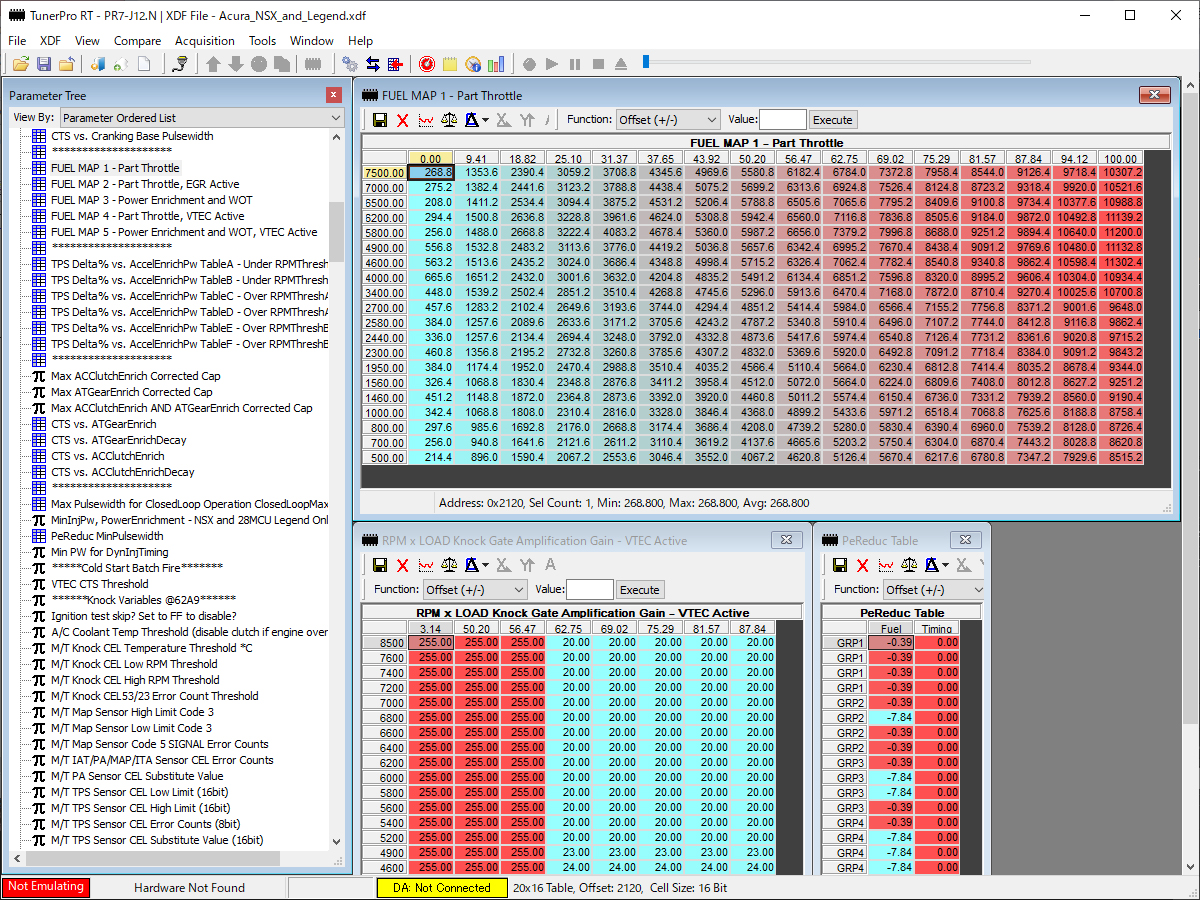
TunerPro Editing Screen